
Create an API Key
Use a separate key for each application and environment. This makes usage easier to trace and lets you revoke one client without interrupting everything else.
Create the key
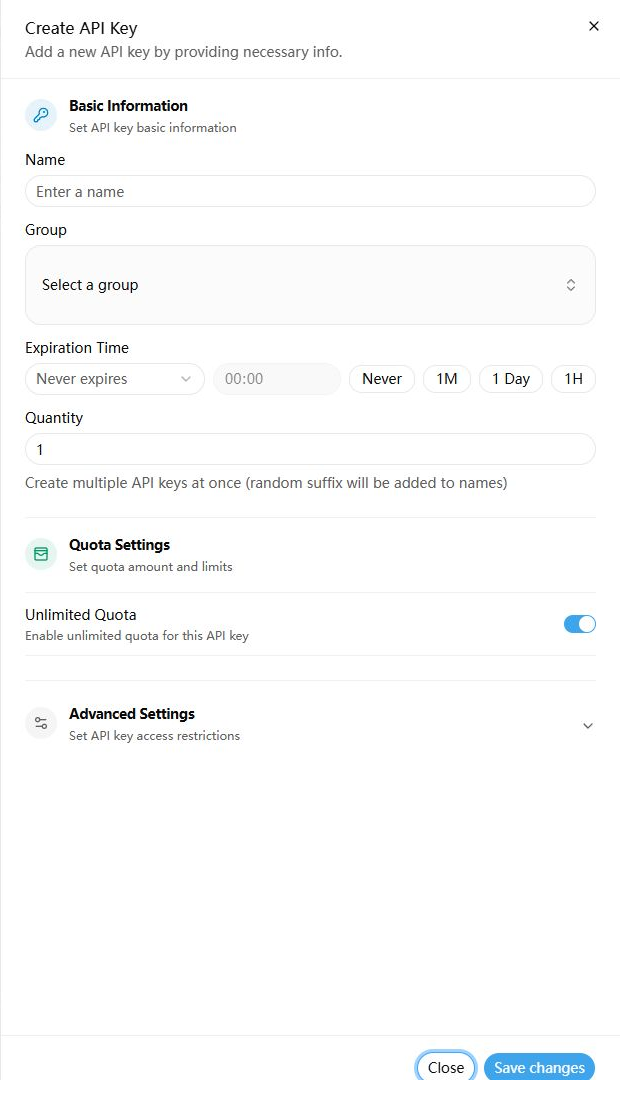
- Open API Keys.
- Select Create API Key.
- Enter a descriptive name, such as
local-developmentorCC Switch. - Choose a group that supports your target model.
- Set an expiration time and a small initial quota.
- Optionally restrict models and IP addresses.
- Save, copy the full key once, and store it securely.
Store it for local testing
Replace only sk-your-key; keep the environment variable name unchanged.
bash
# export makes the key available to commands launched from this terminal.
# Closing the terminal removes this temporary value.
export SPRELAY_API_KEY="sk-your-key"
powershell
# $env: sets the variable for this PowerShell window and its child processes.
$env:SPRELAY_API_KEY = "sk-your-key"
Use the hosting platform's secret manager in production. Never commit a real key to .env.example, Git history, a frontend build, or documentation.
Next: Choose a Group and Model